
You can add an account in Quicken to track almost any bank account, asset, or liability you have in the real world. The more accounts you add, the more closely Quicken reflects your real-world financial situation.
You can add the following types of accounts and features to Quicken. In most cases, you'll want to add all your accounts in the same Quicken data file, so that you can track your overall financial situation. You can add up to 512 accounts of each account type.
Banking
Add checking (Chequing in Canada) , savings, credit card, and cash accounts to:
-
Track income and expenses
-
See where your money really goes
-
Keep more accurate records
-
Balance your checkbook easily
-
Save time with your banking and bill-paying chores
-
Download transactions from your financial institution
-
Receive bills online
-
Make online payments
|
|
|
|
Quicken account |
Real-world account |
|---|---|
Checking
|
Checking
Start with your primary checking account. This is the account where you deposit your paycheck and pay your bills from. |
|
|
|
Credit Card
|
Credit card
Start with the card you use most often, and decide how you want to track your credit card in Quicken. Line of credit
Use a credit card account to track a line of credit that isn't a home equity line of credit. (Use a Home Equity Line (HELOC) account instead.) |
|
|
|
Savings
|
Savings
Add your savings accounts, especially if they represent a significant part of your net worth or emergency reserves. You can also use this account type to track any CDs (certificates of deposit) or money market accounts that you hold. |
|
|
|
Cash
|
Cash expenditures or petty cash
If you want to know where absolutely all your money goes, or if you need to track petty cash for your business, add a Quicken cash account. (If you do, you can save time by tracking cash expenses only to the nearest dollar.) |
|
|
|
Investing & Retirement
Add brokerage, IRA or Keogh, 401(k), 529, and other investment accounts to:
-
Track all your investments in one place, across many different brokerages, institutions, and administrators
-
Analyze your holdings
-
Monitor your performance
-
Maximize your after-tax yield
-
Create and monitor a personalized asset allocation target
-
Balance your portfolio
-
Track employee stock options and stock purchase plans
-
Download transactions from your brokerage or financial institution
|
Quicken account |
Real-world account |
|---|---|
Brokerage
|
Most investment account types
A brokerage account can hold one or more securities (such as stocks, bonds, or mutual funds), with or without an associated cash management or money market fund (sometimes called a "sweep" fund). Employee stock plans
Use a brokerage account type to track Employee Stock Option Grants (ESOG) and Employee Stock Purchase Plans (ESPP). To simplify record keeping, we recommend tracking each of these in a dedicated account. Add a brokerage account, and then use the appropriate procedures to enter the grant and exercise transactions or buy and sell ESPP shares. Other
You can use the Brokerage account type to track any security with a fluctuating value, for which you want to track performance, income, capital gains, or tax implications. Use this account type to track variable or fixed annuities, real estate investment trusts (REITS) or partnerships, and unit trusts. Just add the appropriate number of shares and price, and then periodically update the security price. |
|
|
|
401(k)/403(b)
|
401(k) or 403(b) accounts
Use the 401(k)/403(b) account type to track employer-sponsored retirement plans. Contributions to these accounts are tax-deferred, and your employer may make matching contributions. Quicken can track your holdings whether or not your statement reports transaction-level detail or the exact number of shares you own. |
|
|
|
IRA or Keogh plan
|
Individual Retirement Accounts and IRA-type accounts
Quicken lets you specify the type:
|
|
|
|
529 plan
|
529 plan accounts
Use the 529 plan account type to track your education savings account. When you add a 529 plan to Quicken, Quicken automatically marks the account as tax-deferred. |
|
|
|
|
Single mutual fund |
A fund you purchase directly from the mutual fund company. The single mutual fund account type is only for funds that meet these three conditions:
|
Property & Assets
Add house, vehicle, asset, and loan accounts to:
-
Have a complete picture of your net worth by tracking house, vehicles, and loans
|
Quicken account |
Real-world account |
|---|---|
House
|
The value of your home
Enter the purchase date, the purchase price, and the balance adjustments for any capital improvements or market value changes. You can use the Zestimate feature (This feature is not available in Canada). to get the current estimated current value of your home. When you sell the property, the selling price minus the purchase price represents the gain. Notes
When you add a house account, Quicken also help you add a loan to track the payment schedule, principal, and interest. When prompted, click Yes and follow the on-screen instructions. |
|
|
|
Vehicle
|
The value of a car, truck, or motor vehicle
If this is a business vehicle, you can add balance adjustments to calculate depreciation. Notes
When you add a Vehicle account, Quicken can also help you add a loan to track the payment schedule, principal, and interest. Just click Yes when you're prompted. |
|
|
|
Other Asset
|
Things you own
Use this for valuable assets such as art, collectibles, or capital equipment. As a rule of thumb, decide whether you consider the item to be truly an investment or saleable item. Do you consider its value and appreciation to be part of your overall net worth? If you use it in your business, do you intend to track its depreciation? |
Loans & Debt
Add loans and debt accounts to:
-
Track loan balances and payment schedules
-
Track loan interest
Loan
|
Money you owe
Quicken uses a loan account, which tracks the payment schedule, principal, and interest. Except in the case of a House or Vehicle account, it's usually simpler to add the loan first, and then add the asset account when Quicken prompts you to do so. Notes
To track a standard line of credit (not a home equity line of credit), use the credit card account type . |
|
|
|
Home Equity Line of Credit (HELOC)
|
Your line of credit
Quicken uses a special loan account. It can be linked to your House account to better reflect your net equity, and helps you track a changing balance of withdrawals and payments. |
|
|
|
Other Liability
|
Other money you owe
Use this account type to track informal liabilities, for example money you have borrowed from friends or family that does not have an interest rate or term associated with it. |
Business Accounting (Business & Personal)
Add business accounts to:
-
Track accounts receivable (customer invoices)
-
Track accounts payables (bills from vendors)
-
Create a balance sheet
-
Create a profit and loss (P&L) statement
-
Communicate more effectively with customers, partners, and lenders
Checking, credit card, cash
|
Business-related checking, credit or charge card, and petty cash
Add a Quicken account for each real-world checking, credit or charge card, and cash account. When you enter transactions, use Quicken categories to get the most from reporting, tracking, and analysis tools. |
|
|
|
Invoices/receivables
Requires Quicken Business & Personal. Learn how to upgrade Quicken. |
Accounts receivable
If you use accrual-basis bookkeeping, you must track your accounts receivable (invoices) and customer payments in an invoice account. Add one invoice account for each business you track in this data file. Even if you use cash-basis bookkeeping, an invoices/receivables account can help you track cash flow and forecast income. |
|
|
|
Bills/payables
Requires Quicken Business & Personal. Learn how to upgrade Quicken. |
Accounts payable If you use accrual-basis bookkeeping, track your accounts payable (bills) in a bills account. If you use cash-basis bookkeeping and pay your bills as soon as you receive them, then you don't need to add a bills account. Just create bill reminders to remind you when bills are due. (The accounts payable reports may still be helpful, though, for managing your cash flow and tracking unpaid bills.) |
|
|
|
Sales tax
Requires Quicken Business & Personal. Learn how to upgrade Quicken. |
Amount you owe to local tax district for products you sell
Quicken adds a sales tax account for you the first time you enter an invoice item for which you charge sales tax. If you do business in more than one tax district, you can add a sales tax account manually. |
|
|
|
Property & Debt
|
Capital equipment
Add a property account for any item that you consider to be part of your business's balance sheet, or for capital equipment that you intend to depreciate. Add a debt account to track any amount you owe. If there is an outstanding loan, click Yes when you're prompted to add a loan. Quicken uses the loan feature in conjunction with the property account to track the payment schedule, principal, and interest. |
|
Quicken account |
Real-world account |
|---|---|
Rental Property (Business & Personal)
Add rental property accounts to:
-
Track rent receivable
-
Track the net worth of the rental property
-
Track loan against the rental property
-
Track security deposit liability
-
Create a balance sheet
-
Create a profit and loss (P&L) statement
|
Quicken account |
Real-world account |
|---|---|
Checking, credit card, savings, cash
|
Rental property checking, credit, savings, or cash
Add a Quicken account for each real-world checking, credit, savings, or cash account. When you enter transactions, use Quicken categories to get the most from reporting, tracking, and analysis tools. |
|
|
|
House
|
The value of your property
When you add a property in Quicken, Quicken creates a house account having the same name as the property name and links the house account with the property. But if you already have a house account in Quicken, you can link that house account with a rental property. When you add a house account, enter the original purchase price and the purchase date. Use the Zestimate feature regularly to enter the adjustments for any capital improvements or market value changes. Notes
If you want to link a house account with a loan account, right-click the account name in the Account Bar, click Edit/Delete Account, and select the name of the loan account in the Mortgage Account list. Quicken can also help you add a loan account to track any amount you owe, and then add a loan to track the payment schedule, principal, and interest. |
Loan
|
Loans
Add a loan account to track any amount you owe, the payment schedule, principal, and interest. |
Tax-related
Set up a paycheck and tax-related accounts to:
-
Simplify tax planning
-
Estimate your upcoming tax liability
-
Save time with tax preparation
-
Export Quicken data into TurboTax
-
Minimize your tax bill
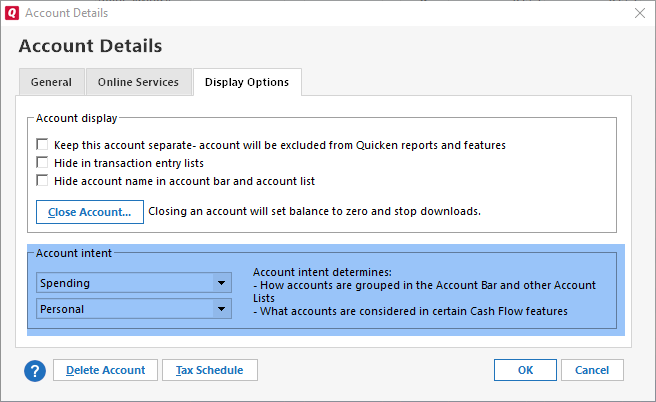
You cannot change an account type (for example changing a Savings account to a Credit Card account). You can, however, change the Account Intent (such as from personal to business). Many options are only available for higher tiers of Quicken such as Quicken Business & Personal.
To do this:
-
Right-click on the account in the sidebar and select Edit/Delete Account.
-
On the Account Details screen, select the Display Options tab.
-
In the Account Intent section, select from:
-
Spending
-
Savings
-
Investment
-
Retirement
-
Asset
-
-
You can also select from:
-
Personal
-
Business
-
Rental Property
-
-
Once you have selected your Account Intent, click OK.
The following terms will be different in the Canadian releases of Quicken.
Canada: "Cheque" / United States: "Check"
Canada: "Colour" / United States: "Color"
Canada: "Centre" / United States: "Center"
Canada: "Realise" / United States: "Realize"
Canada: "Behaviour" / United States: "Behavior"
Canada: "Analyse" / United States: "Analyze"